
Connecting your Discogs account lets you manage your Discogs Marketplace from the Backoffice. Once your account is connected, you can:
Automatically fetch release information from the Discogs database.
Import the listings already live on Discogs into your Common Ground inventory.
List, edit, or unlist your items on Discogs from the Backoffice.
Import your Discogs orders into Common Ground and process them alongside your online and in-store sales.
Your stock stays in sync across both platforms. When an item sells in your online store or in-store and goes out of stock, it's automatically hidden on Discogs.
Connect your Discogs account with Common Ground
To connect your Discogs account with Common Ground and sync release data, listings and sales, you need to :
Go to Preferences > External Services and select Connect my Discogs Account.
Follow the prompts and authorize Common Ground to access your Discogs account.
Import your existing Discogs inventory
If you already have listings on Discogs, import them into your inventory before you start selling from Common Ground.
Warning: Listings can't be unlisted or deleted in bulk from this page. Remove the Discogs listings you don't want to keep before you import your inventory.
Review your Discogs listings.
Select the action you need:
Import All imports and syncs all your Discogs listings.
Import to inventory imports a single listing.
Unlist from Discogs removes a single listing from Discogs Marketplace.
Keep your listings synced
Once your inventory is synced, manage your Discogs listings from the Backoffice only. Changes made directly on Discogs can cause stock discrepancies and order import errors.
To add a new item, create it in your Common Ground inventory first, then select List to Discogs from the Backoffice (see List / Unlist items to Discogs). Edit or unlist your listings from the Backoffice as well, so both platforms stay matched.
Don't create listings directly on Discogs, and don't edit or delete synced listings there. Common Ground won't pick up those changes, and your stock will no longer match.
We also recommend turning off auto-cancellation on Discogs. When Discogs automatically cancels an order, the items aren't relisted, so you'd have to put them back on sale yourself.
Note: If you created a listing directly on Discogs, you can find and manage listings that aren't synced in Discogs listings.
Common Ground → Discogs API
Discogs allows Common Ground to send only one request per second to its API. Because of this limit, Discogs orders are imported and updated as follows:
We only scan for new orders on your Discogs profile every 30 minutes.
We only scan the last 20 orders on your Discogs profile.
We only update orders that are beyond the last 20 orders when you open the order page in Common Ground.
We cannot import messages that aren't in an order.
Orders merged on Discogs aren't imported.
Items will be hidden on Discogs marketplace if they are sold out from your Backoffice
Auto-Cancelled orders (non-paying customer): items must be manually re-listed
Fix stock discrepancies
A stock discrepancy happens when the same listing exists on Discogs and in Common Ground, but the two aren't matched. Discrepancies are rare if you follow the sync guidelines above.
Warning: Orders containing unsynced listings cannot be imported and will trigger a Discogs Import Error:
The Discogs order [order number] could not be imported. The release: [release] has insufficient stock quantity or a corresponding listing was not found.
Update the stock or fix the sync. The order is then imported automatically.
Use Discrepancy Reports
Go to Inventory > My Discogs Inventory > Discrepancy Reports.
Review the flagged listings and resolve them. See Discogs discrepancy reports.
Check the Discogs release ID
Another way to ensure listings are properly synced is to verify that the correct ID numbers match between Discogs and Common Ground:
On Discogs, open the release page and note its release ID.
In the Backoffice, open the same release and compare the Discogs release ID shown on the release page.
If the IDs don't match, the listing isn't synced. Use Discrepancy Reports to fix it.
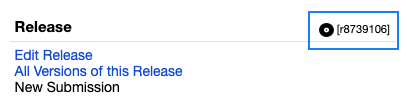
Discogs release ID number